This is default featured slide 1 title

Go to Blogger edit html and find these sentences.Now replace these sentences with your own descriptions.This theme is Bloggerized by Lasantha Bandara - Premiumbloggertemplates.com.

This is default featured slide 2 title

Go to Blogger edit html and find these sentences.Now replace these sentences with your own descriptions.This theme is Bloggerized by Lasantha Bandara - Premiumbloggertemplates.com.

This is default featured slide 3 title

Go to Blogger edit html and find these sentences.Now replace these sentences with your own descriptions.This theme is Bloggerized by Lasantha Bandara - Premiumbloggertemplates.com.

This is default featured slide 4 title

Go to Blogger edit html and find these sentences.Now replace these sentences with your own descriptions.This theme is Bloggerized by Lasantha Bandara - Premiumbloggertemplates.com.

This is default featured slide 5 title

Go to Blogger edit html and find these sentences.Now replace these sentences with your own descriptions.This theme is Bloggerized by Lasantha Bandara - Premiumbloggertemplates.com.

Showing posts with label Android Tricks. Show all posts

Saturday, 8 August 2015

How To Increase Ram In Android

Note: Increasing ram does not mean that you are internally adding some hardware to your Android phone. Its not possible for a normal man to alter the hardware of Android device so as to increase its Ram. Its been risky and one need to be professional to change the hardware. And also manufacturer has some guidelines for this. But don’t worry there is some simple way to increase ram in Android, you just need to follow the instruction. And you can easily increase your ram in maximum 10-15 minutes. Using this method or trick you can increase your ram upto 4 GB.

Requirements:

1. SD card as you want but class 4 or higher SD Card will give excellent speed to your Phone.

2. Rooted smartphone.

Or Rooted Tablet (If you want to increase RAM and Internal Memory of it.)

3. SD card reader

4. Windows PC

5. An internet connection for downloading a few softwares or you can get it from somewhere else also.

PARTITION YOUR SD CARD:

First step you have to do is to partition your SD Card and for doing this you have to,

1. Download Mini tool Partition from Here

2. Install the application on your PC and connect your SD card to your PC with Card Reader.

3. Open Mini Tool Partition in your PC and when the wizards open click on your SD Card and select Delete option. (Note: This will format your SD Card completely mean that it will erase your data permanently, so previous to doing this backup your data at any place in PC or other Storage device.)

4. When the Formatting of your SD Card is completed then, you have whole of space of your SD Card as unallocated then Right click SD Card and select make option.

5. A popup box will open giving you options for making partition; select the partition as primary and file system as FAT if SD Card is less than 4GB or FAT32 if your SD Card is more than 4GB.

6. Leave about 512 MB or more space (your choice) for making the next partition.

7. Then select done and do right click on unallocated space of your SD Card and again click make option. Select Primary partition but change the file system to Ext2, Ext3 or Ext4.

Note:

(Ext2 is not compulsory as most ROMs work fine with it). .

HOW TO MAKE RAM OF SD CARD ANDROID:

1. Click Apply Changes and then process goes on for the few minutes and then partition is completed.

2. Install Link2sd from Google Play or download and install the .apk format file from here to your phone.

3. On the first launch of the app, it will question for root permissions and then, it will question you the file system of the .ext partition that you had before made, choose the option as you had choose in the partitioning steps.

4. Sort the apps according to size and start linking them.

Root Any Kitkat Andriod Phone Just a single Click

.

Hello

My Android Lover Visitors Welcome Come Back At www.all-hacking-tricks.tk Here Is The Tricks

At First Download KINGROOT apk file

Click here to download apk

√Then open KINGROOT app and click to green button.....

√wait some second and root successfull....

√then reboot your phone.....

Enjoy Guyzz..

Restart Your Friends Phone By SMS

Warm Greetings!If you want to have some fun with your buds you can use this simple and easy trick that can also be called (SMS Virus) also it's harmless. So let's go ahead, in your Nokia Phone Follow these steps:

1- Go to Message menu

2- Create message; in Create message type 79 commas (e.g. ,,,,,,,,,,)

when you are done just send it to your friends mobile number, that's all

Friday, 7 August 2015

Convert Any 1 GB Or 2 GB Memory/SD Into 4GB

Hi Guys ...

AS U KNOW I UPDATE MY BLOG DAILY . SO TODAY I M COMING WITH AN AMAZING TRICK WORKING BY ME..

With This You Can Convert Your 1 Or 2 Gb Memory Card Into 4 Gb If You Like This Trick Then Follow All Steps Carefully

Follow These Simple Steps-

1- 1- First Of All Take A Backup Of Your Memory Card...

2- Now Download This Toolkit In Your Pc..By CLICK HERE

3- Extract 'increase internal space of memory Card Toolkit' which you have downloaded.

4- Now Put Your Memory In Computer..

• But First Take Backup...

5- After Backup Of Your Memory Then Open Drive Increaser.bat file from extracted folder.

6- After That The Script Will Open In Your Pc..It Will Ask You For Name Of Your Memory/Sd Card.. like Faisal(G)

7- Now Your Have To Enter Your Drive's Letter... If You Don't Know Your Drive's Letter Then Go To My Computer.

8- Here You Will See Your Drive's Letter

• for example because it very important to be careful while entering your drive name. Like My drive's name is G:

9- Now Again Enter Your Drive Name...

10- Now Wait Some Time.. It Script Can Take 2-10 Minutes Or Maybe More...

11- Its All Done Now See Your Memory Card Internel Space If It Is 4 GB ( Then You Have Good Luck ) If It Is Not Increshed [Then You Have Bad Luck ]

• If it increased then now, you have converted your Memory Card/SD card's internal storage and now you can restore the backup that you have taken.

Enjoy This awsome Trick. :)

Keep Visiting here. ;)

Thursday, 23 July 2015

Auto liker app for Android – MG Likers Unlimited Status & Pictures Like


INTRODUCTION:

World's popular likes exchanging system now on android join now login with your Facebook account and get likes on your Facebook status and photos.

" The only Facebook Autoliker app and its free" Basically this app is for those who are not getting enough likes on facebook and for those who want more likes on facebook , by using this application you'll be able to get 200 likes per shot.

STEPS:

1.At First, Install MG Likers Android App in your Android phone from here

2.Now Open App, & Login With your Facebook Account

3.Click on “Use Auto Liker” or Auto Commenter which service you wanna use Click on Status like & get Likes on your Status According to your

Choice, Maximum 200 Likes on One Status or Picture at a time.

Enjoy Likes on Your Facebook Status or Pictures with Mg Liker android app.

NOTE:

KeEP VISITNG AND SHARING OUR BLOG

Friday, 17 July 2015

How To install Android Apps On Pc Or Laptop ??


INTRODUCTION:

Today I Tell You How To install Android Apps On Computer Or Laptop. In our day to day life we are using android apps for completing our tasks and android games for entertainment. We can run these android apps and games on our PC using'BlueStacks'.With the help of BlueStacks App player you can run your favourite android apps/games on your PC. Just Follow Below Steps.

STEPS:

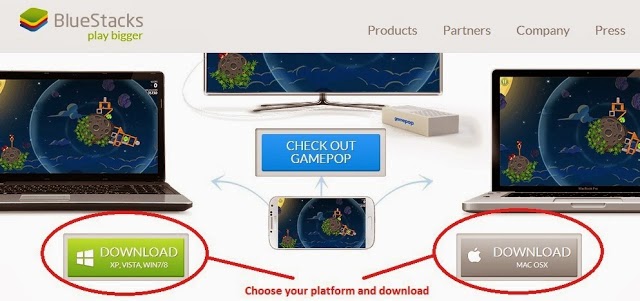
1) Go to BlueStacks site and download BlueStacks software based up on your OS


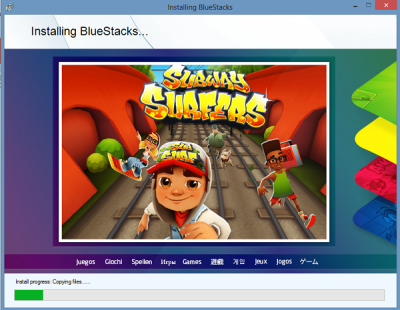
2) After the download is finished , you need to open the download file and go through the setup and you are done the installing process.


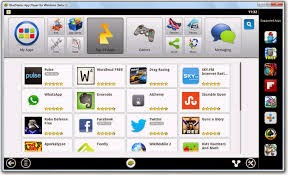
3) After that you will see BlueStacks application window Apps and icons.


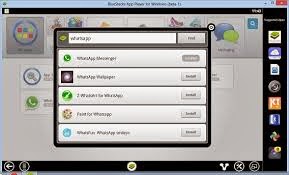
4) Now search for the application that you want to install on your PC.


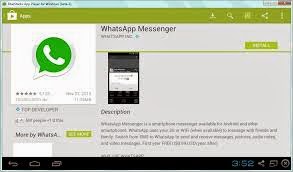
5) Now you can install all android apps fromGoogle Play storewith in BlueStacks. Just click on Install button and BlueStacks will download apps to your computer.


6) Done !! Now you can see your app at the top of the window. If you don't see it, Click All apps button at the right side of the window.

NOTE:

This application require at least 2GB of physical memory(RAM). Once you have downloaded and installed BlueStacks then restart your computer if you have less than 4GB RAM. But if you have RAM greater than 4GB then you will not face any error

Sunday, 12 July 2015

How To Lock your Phone with Volume Button pattern?


INTRODUCTION:

You might be locking your android phone’s app(s) with a pin or password,in order to prevent their un-authorized usage/access ,

But today we are introducing a new app ‘Oopsapplock’ This app will let us lock apps using Volume button patterns,no need for any screen password, everything works in totally invisible mode,follow the steps below to use it.

STEPS:

a)Download Oops! App lock from the Playstore

b)After installing,you will see a notification- Warning you re entering restricted area,

c)To lock an app,Swipe in the app,and view/add or refresh the lock list.

The default pin is Volume up,Volume up and Volume up.

NOTE:

visit Daily For More Tricks (y)

Sunday, 5 July 2015

Create Fake Govt Proof To Bypass For Fb Disebled and Locked Account


INTRODUCTION:

FrIends Now a day Lots of people Face Photo VerIfication,Disebled Issued by Udpdating fake Info in profile So no worries about that I have a tweak Making a fake Id prof by usIng Fake Id Generator App nd Cheat Mark Zuckerberg nd Active your Fb Id

STEPS:

» FIrst DownLoad Fake ID GeneraTor App From here

» After Download, Install it nd Open App

» Then Fill your name nd DOB (Fill DOB nd NAME Which You Provide In your FB Profile)

» Now Choose CounTry.

» Then Upload Any Your Color Photo.

» Finally Click On "Generate". Its Done Your Fake Id Proof Is Ready .

MUST READ

How To Increase Your Facebook Likes with auto liker 2015?

NOTE:

ITS 90% WRKING

Answer Any Call WIthOut ToucHIng Your AndroId DevIce Screen !


INTRODUCTION:

Answer The Call WIthout TouchIng Phone Screen LIke SamSung S5

FrIends Today I'm BrIng WIth You One CoOl Tweak U Can Answer The Call WIthOut ToucHing The Phone Screen Air Call-Accept is a free app available in the Play Store that lets you wave over your phone to answer an incoming call, just like Galaxy S5, on any Android smartphone.

STEPS:

» FrIends FIrst DowNload AIrCall Accept Free App From here nd Install It

» Run the app and switch on the functionality

» Now your app is ready, thus whenever you will get a call all you need is to wave your hand over the proximity sensor area nd your phone should pick up the gesture.

Now EnJoy NOTE:

>You can Answer Calls by putting your hand or ear close

>You can Reject call also

>You can automate the speaker phone

>Can send SMS after rejecting call

How To Use Your Memory Card As Ram?


INTRODUCTION:

Hello friends, Now a days a large number of peoples using Android almost 80% Of peoples using Android phone

Today because android gives awesome feature with great look almost its provide all thing which makes phone smart but one main Problem comes for android users which is "Not enough memory". And its become embarrassing When you download any important things but a Popup Comes To Mobile Screen that "Your memory card full" on that condition you become little bit sad.

But don't worry today I give you a best way by which you can expand your memory properties, so simply follow given below steps to get this.

STEPS:

*.First of all you have to download Roehsoft Ram Expander From HERE

*.After downloading Install it.Open it and Now you have to create a swap file than click on Swap activate and Enable it by simply Click on "Activate Swap".

*.Finally All done.

*.Congo!!!! You Moved Your RAM To Your SD Card.

NOTE:

Stay connect with us for more tips and tricks.

Use Web Version Of Facebook Messenger By Facebook (Official)


INTRODUCTION:

Friends here one good news for you Facebook launched web version of Facebook messenger. So now you can use Facebook official messenger which is only available for Windows Phones,

Androids, iPhones and now available for Desktop users also. It's looks like same as Whatsapp version and compatible in all browser like Chrome, Mozilla Firefox, opera etc. Let's starts how it's works.....

STEPS:

1.Firstly Open your Facebook account.

2.Now Open This Link https://www.messenger.com/

3.Click On Blue Button Which Shown''Continue as ...... ''

4.Now all chat shows on browser, same as your mobile version.

5.That's It, enjoy.........

How To Run Multiple Instagram Accounts In Android?


INTRODUCTION:

Run Multiple HostaGram nd What's App Account In your AndroId DevIce

Android is only the plateform which provides lots of features in the world of smartphones . You just need is Instwogram appto use multple whatsapp account in your android phone.By this app you can easily add two account of instagram in your android device and there is no need of rooting an android to do so.

Click HereTo DownLoad InstWoGram App

» Some users having problem with facebook account linking with instwogram application.

Follow below simple steps to get it work.

STEPS:

» First install official facebook appin your mobile.

» Download the latest instwogram app from above given link.

» Now login to your FB account, go to account setting–>apps–>Instagram–> and remove Instagram from it.

» Open instwogram, share a picture on it and login to your facebook account.

» You will be successfully linked to your facebook account with instwogram.

How To Make Your Android Mobile Notify You at Any Battery Level?


INTRODUCTION:

Hi Friends By now, everybody knows that overcharging abattery will reduce its overall life span.This is why many smartphone manufacturers recommend that you charge your device to 100%, then unplug it immediately.

Some even go so far as to automatically stop charging when the device is fully juiced, although not all devices have this functionality.

Add the fact that we generally don't know the exact moment that our phones reach a full charge. Are we supposed to constantly check on it throughout the charging process so we can unplug it in time? That's certainly a less-than-ideal solution.

So the development team atTMK Appscreated asimple tool that will notify you when your battery reaches a certain level. You can set this threshold at 100% to prevent overcharging, or you can even go with a lower number for those days when you know you're not going to be around a charger later and you want to make sure you can fully top up in time.

STEPS:

*Install TMK Battery Alarm on the Google Play Store FROM HERE.

Step 2 : Set an Alarm Battery Alarm sports a rather intuitive interface.

To set an alarm for when your battery reaches a certain percentage, adjust the slider in the middle of the screen.


From here, tap the bell icon to choose a ringtone. There are three alarm tones to pick from, and a sample will be played when you select any of the options.


When you're ready, just tap the alarm clock icon in the top-right corner to set your battery alarm. Its color will change from red to green to signify that your alarm is active, as well as show a notification for the app.


As soon as your battery hits that certain percentage, the alarm will sound. Now you can easily tell when it's time to unplug or when it's time to get your phone recharged before it's too late.

Friday, 3 July 2015

How To File Transfer From Smartphone To PC/Laptop Using WiFi?


INTRODUCTION:

Many times we need totransfer files from our phone to PC/Laptop or vice verse. For transferring data we generally use USB data cable. But you cannot carry or have USB all the time with you but any situation or time when you have to need to transfers data from computer/laptop to your phone or vice verse in school/college/office or any other place then it becomes difficult for it. Have you ever tried to transfer any data such as any document, songs, videos, movies, software, games etc. between your PC/Laptop and Smartphonewithout using of USB data cable?

Yes, what you have heard is right. You can easily share files wirelessly using Software Data Cable. STEPS:

Step 1:First of all Downloadan Install Software Data Cable from Play Store.

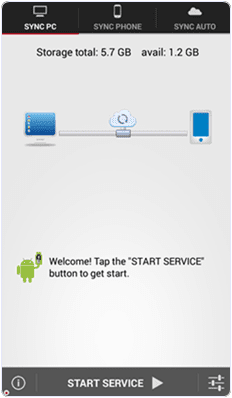
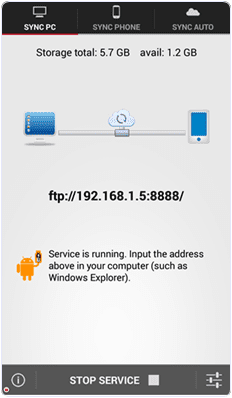
Step 2:Once installed in your phone, just open it and click on START SERVICEas shown below.


Step 3: Connect your computer and the smartphone to thesame Wi -Fi network.

Step : -4> Install and run your app into thesame Android phone.


Step : -5> Then you will get ftp://192. 168. 1.5:8888 address , copy that ftp address into your computer address bar and then press on OK button . After that

Step : -6>Storage Folderis automatically generated where your all transfer files stored now .In this way you can transfers the data from your android phone to computer or vice verse .

NOTE:

Share this trick with your friends and if you have any problem then feel free to comment below .

Thanx For Visit!ng us .

HOW TO VIEW SAVED WIFI PASSWORDS IN ANDROID (ROOT)?


INTRODUCTION:

Hi Friends Some time you are connected to your friends wifi but you dont know the password of the wifi. Because your friend does not want to share the password. But if you are connected to the wifi with your Android and don'tknow the password? So you can know the password with this trick.

Requirements :-

* Rooted Android Mobile * ES File Explore

Follow Below Steps to View Saved Wifi Passwords In Android 2015 :-

STEPS:

1) Move up a folder (to the root folder) in ES File Explorer and you will see a directory called data.

2) Goto data > misc > wifi folderand you will find a file namedwpa_supplicant.conf.

3) Open the file and make sure you use ES File Explorer ‘s built-intext/HTML viewer for the task.

4) Now in this file you will be able to see the network SSID and their passwords.

5) Now note down the network name and its password.

6) In this way you will be able to view all saved wifi password in android device.

7) Please do not edit anything in wpa_supplicant.conf as it can alter your device working or it will have affect on your wifi connectivity.

NOTE:

Visit Daily For Awsme Tricks

How To Change Your Friend’s Profile Picture on Whatsapp?


INTRODUCTION:

You can’t actually change your friend’s WhatsApp Profile Pic from your phone globally but you can change it for your phone so that whenever someone will check it on your WhatsApp, he/she will see your assigned profile pic for that friend.

So, it would be a great way to make fun of your friends.

To do this, follow these steps:

STEPS:

*.Download weird-looking/funny picture that you want to assign for your friend’s WhatsApp profile pic.

*.Resize it to 561 x 561 pixels and name it with your friend’s mobile number from which he use WhatsApp.

*.Save the image to SD Card>>WhatsApp>>Profile Pictures. Overwrite existing file (if required).

*.Now, show you friend his profile pic from your WhatsApp to invite instant panic to his face.

NOTE:

Disable WiFi/Data connection so that WhatsApp will not automatically update the pic.

How To Extract .apk File From Android Phone?


INTRODUCTION:

Android devices are popular because they provide amazing features at cheap price as compare to IOS or other expensive devices. Android devices are hardware independent and has its own operating system based on Linux. Android devices are very flexible like we can install own UI by installing custom Roms. You can also check Best Android Customs Romsbut to flash all these customized features we need to root android phone .Android have huge marketplace like Google Play Store. Where we can easily find android apps and games easily. But when we find new Apps from Play Store there is only option for install now there. The .apk file is directly installed on our device. Apk file is an installer for Android operating system just like .exe files for Windows. After installation, these files are not available normally to anyone other for sharing and installation into other device as like we share Windows Software setup. So others devices have to download these apps and games again in their Android device. As we already android devices are flexible and huge number of advance apps are developed to access many useful features. As i listed out best root apps for android.There are some apps which provide us such amazing features which are not provided by UI Makers. So to remove such problem of .apk file sharing. Here we are going to provide you some best methods to extract .apk file from installed Android Apps and easily share and install on another device.

STEPS:

1.Install Apk extractor From Here into your Android device .

2.You can also download file manager to find the .apk file after extracting the file. By default the files are stored in/sdcard/ExtractedApks/.

3.Open the Apk extractor App on your device.

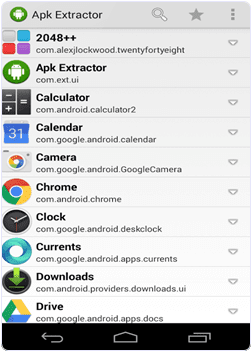
4.After launching the App you will see a list of installed Applications on your Android device.


5.Select the App whose .apk file you want to get.

6.You can also share the apk file tap and select the share option.

7.Tap the menu button-> then setting to change the path where you want to save .apk file.

NOW U DOne :-)

NOTE:

Visit And Share daily