This is default featured slide 1 title

Go to Blogger edit html and find these sentences.Now replace these sentences with your own descriptions.This theme is Bloggerized by Lasantha Bandara - Premiumbloggertemplates.com.

This is default featured slide 2 title

Go to Blogger edit html and find these sentences.Now replace these sentences with your own descriptions.This theme is Bloggerized by Lasantha Bandara - Premiumbloggertemplates.com.

This is default featured slide 3 title

Go to Blogger edit html and find these sentences.Now replace these sentences with your own descriptions.This theme is Bloggerized by Lasantha Bandara - Premiumbloggertemplates.com.

This is default featured slide 4 title

Go to Blogger edit html and find these sentences.Now replace these sentences with your own descriptions.This theme is Bloggerized by Lasantha Bandara - Premiumbloggertemplates.com.

This is default featured slide 5 title

Go to Blogger edit html and find these sentences.Now replace these sentences with your own descriptions.This theme is Bloggerized by Lasantha Bandara - Premiumbloggertemplates.com.

Showing posts with label Android Useful Apps. Show all posts

Saturday, 8 August 2015

How To Increase Ram In Android

Note: Increasing ram does not mean that you are internally adding some hardware to your Android phone. Its not possible for a normal man to alter the hardware of Android device so as to increase its Ram. Its been risky and one need to be professional to change the hardware. And also manufacturer has some guidelines for this. But don’t worry there is some simple way to increase ram in Android, you just need to follow the instruction. And you can easily increase your ram in maximum 10-15 minutes. Using this method or trick you can increase your ram upto 4 GB.

Requirements:

1. SD card as you want but class 4 or higher SD Card will give excellent speed to your Phone.

2. Rooted smartphone.

Or Rooted Tablet (If you want to increase RAM and Internal Memory of it.)

3. SD card reader

4. Windows PC

5. An internet connection for downloading a few softwares or you can get it from somewhere else also.

PARTITION YOUR SD CARD:

First step you have to do is to partition your SD Card and for doing this you have to,

1. Download Mini tool Partition from Here

2. Install the application on your PC and connect your SD card to your PC with Card Reader.

3. Open Mini Tool Partition in your PC and when the wizards open click on your SD Card and select Delete option. (Note: This will format your SD Card completely mean that it will erase your data permanently, so previous to doing this backup your data at any place in PC or other Storage device.)

4. When the Formatting of your SD Card is completed then, you have whole of space of your SD Card as unallocated then Right click SD Card and select make option.

5. A popup box will open giving you options for making partition; select the partition as primary and file system as FAT if SD Card is less than 4GB or FAT32 if your SD Card is more than 4GB.

6. Leave about 512 MB or more space (your choice) for making the next partition.

7. Then select done and do right click on unallocated space of your SD Card and again click make option. Select Primary partition but change the file system to Ext2, Ext3 or Ext4.

Note:

(Ext2 is not compulsory as most ROMs work fine with it). .

HOW TO MAKE RAM OF SD CARD ANDROID:

1. Click Apply Changes and then process goes on for the few minutes and then partition is completed.

2. Install Link2sd from Google Play or download and install the .apk format file from here to your phone.

3. On the first launch of the app, it will question for root permissions and then, it will question you the file system of the .ext partition that you had before made, choose the option as you had choose in the partitioning steps.

4. Sort the apps according to size and start linking them.

Short Your Link By Url Shortner Collection

We Use Link Shortner For Short A Long Url. After My Searching I Collect Many Url Shortner Website That Can Redirect Your Link.

GO TO BELOW LINK AND ENJOY.

http://is.gd

http://v.gd

http://goo.gl/

http://Ow.ly/

http://bit.do

http://bc.vc/

http://yourls.org/

http://tiny.cc/

http://tr.im/

http://tinyurl.com/

How To Change Android Kitkat Or Jellybean To Latest Android L 5.0 .2

Hello dear frnd..... today i share a very useful trick...you will socked to know it.....

Are You Annoyed With Your Friends By There Show Off?? That They Have Latest Android Version Kitkat 4.4.4 With Android L 5.0 Update Guarntee!.

Shut There Mouth By Showing That You Have Latest Android Version 5.0.2. Yes Friends, Its Possible Even If You Don’t Have Updation Guarntee From Your Smartphone Manufacture And You Do No Require Any Coding Language Or Custom Rom For This.

How To Change Android Version To Latest Release:

1. Download Ex-File Manager From Playstore.

2. Then Enable Root Acess For It.

3. Now Choose Device And Click On System.

4. Now Search For Build.Prop File And Edit Is As Shown In Next Step. In Build.Prop File You Will See Text Code As Show Below.

5. Now You Need To Replace 4.4.4 With Your Likely Version. (Ex. 5.0.2 ro.build.version.release=4.4.4)

6. Now Click On Back Button, One Popup Will Be Shown Just Click On Save Button.

7. Reboot [Restart] Your Phone And Check Your Android Version It Will Of The New & Same Android Version Which You Just Edited In Build.prop File..

Don’t You Understand It Properly??

You Need Not To Worry! We Have Made. video Tutorial For Your Better Understanding.

Click here to watch Vedio

Note: In Order To Use Above Tweak Your Phone Must Be Rooted.

Root Any Kitkat Andriod Phone Just a single Click

.

Hello

My Android Lover Visitors Welcome Come Back At www.all-hacking-tricks.tk Here Is The Tricks

At First Download KINGROOT apk file

Click here to download apk

√Then open KINGROOT app and click to green button.....

√wait some second and root successfull....

√then reboot your phone.....

Enjoy Guyzz..

What is Android Rooting?

First, for the newbies, let me clarify what rooting is. Getting root or rooting your phone is the process of modifying the operating system that shipped with your device to grant you complete control over it.

This means you can overcome limitations that the carriers and manufacturers put on your phone, extend system functionality, and even upgrade it to a custom flavor of Android.

The name root comes from the Linux operating system world, where the most privileged user on the system (otherwise known as Administrator on Windows) is called root

Installing a ROM may require rooting first, but just rooting can be usually done in only a few minutes, keeping your stock OS otherwise completely intact.

Different Mobile have Different rooting process ..

Usually rooting is fairly simple - in most cases you can find several videos and articles on the web that explain how to do it on your specific phone model - just

Google ''YOURPHONEMODEL root''.

Rooting is not something manufacturers or carriers approve of but they can''t really prevent it from happening because the rooting process usually exploits a vulnerability in the operating system code or device drivers and allows the ''hacker'' to upload a special program called su to the phone. This program is the one that provides root access to programs that request it.

Friday, 7 August 2015

Convert Any 1 GB Or 2 GB Memory/SD Into 4GB

Hi Guys ...

AS U KNOW I UPDATE MY BLOG DAILY . SO TODAY I M COMING WITH AN AMAZING TRICK WORKING BY ME..

With This You Can Convert Your 1 Or 2 Gb Memory Card Into 4 Gb If You Like This Trick Then Follow All Steps Carefully

Follow These Simple Steps-

1- 1- First Of All Take A Backup Of Your Memory Card...

2- Now Download This Toolkit In Your Pc..By CLICK HERE

3- Extract 'increase internal space of memory Card Toolkit' which you have downloaded.

4- Now Put Your Memory In Computer..

• But First Take Backup...

5- After Backup Of Your Memory Then Open Drive Increaser.bat file from extracted folder.

6- After That The Script Will Open In Your Pc..It Will Ask You For Name Of Your Memory/Sd Card.. like Faisal(G)

7- Now Your Have To Enter Your Drive's Letter... If You Don't Know Your Drive's Letter Then Go To My Computer.

8- Here You Will See Your Drive's Letter

• for example because it very important to be careful while entering your drive name. Like My drive's name is G:

9- Now Again Enter Your Drive Name...

10- Now Wait Some Time.. It Script Can Take 2-10 Minutes Or Maybe More...

11- Its All Done Now See Your Memory Card Internel Space If It Is 4 GB ( Then You Have Good Luck ) If It Is Not Increshed [Then You Have Bad Luck ]

• If it increased then now, you have converted your Memory Card/SD card's internal storage and now you can restore the backup that you have taken.

Enjoy This awsome Trick. :)

Keep Visiting here. ;)

Samsung Mobile Phones - The Master Reset Code

Samsung reset code

This code will restore you phone back to Factory settings without deleting any of your data"

On the homescreen of your phone, dial:

#*7728# on legacy models

*2767*3855# on the recent models (Monte, Omnia..etc)

Note => For educational Info only, try it on your own risk. We are not responsible for any Damage

Thursday, 23 July 2015

Auto liker app for Android – MG Likers Unlimited Status & Pictures Like


INTRODUCTION:

World's popular likes exchanging system now on android join now login with your Facebook account and get likes on your Facebook status and photos.

" The only Facebook Autoliker app and its free" Basically this app is for those who are not getting enough likes on facebook and for those who want more likes on facebook , by using this application you'll be able to get 200 likes per shot.

STEPS:

1.At First, Install MG Likers Android App in your Android phone from here

2.Now Open App, & Login With your Facebook Account

3.Click on “Use Auto Liker” or Auto Commenter which service you wanna use Click on Status like & get Likes on your Status According to your

Choice, Maximum 200 Likes on One Status or Picture at a time.

Enjoy Likes on Your Facebook Status or Pictures with Mg Liker android app.

NOTE:

KeEP VISITNG AND SHARING OUR BLOG

Monday, 20 July 2015

Top 5 Best Antivirus For Android Phones 2015 (Free)


INTRODUCTION:

Recently, there has been an increase in the requirement of android phones. With each passing days, various kinds of tough and hardcore virus are making their way into our PC and system. Not only they are becoming hard to dispose off but end up causing havoc and deleting all our important files. Also check out our recent post on best android apps 2015.

Why you need best antivirus for android phones? Just recently, a dangerous virus called Dendroid started attacking the devices running on Android OS. So, the question arising on most of our mind is how can android phones be protected?Since there are various best android antivirus available on Google play store, but how many of them are worth the dollar you pay?

TOP 5 APPS:

1. AVG Antivirus – Best Antivirus Android 2015 (Free)

This is one of the best android antivirus 2015 and they are not only suitable for PCs but even compatible for android tablets and mobiles. The rating for this antivirus is 4.4 and the best part is that it is available for free.

2. 360 Security – Best Android Antivirus 2015 (Free)

This is a free and best antivirus android tool whose rating on the play store is about 4.4.The best part of using this tool is that you can easily scan and remove the virus which causes havoc to your PC and android devices.

3. Avast Mobile Security – Best Antivirus Android 2015 (Free)

Like all the best antivirus for android phones available online, AVAST Mobile Security is one of the best Android antivirus software which provides not only the best security but even provides unwanted viruses and files. On play store, the rating for this tool is about 4.4.

4. NQ Mobile Security – Best Antivirus For Android Phones 2015 (Free)

This is one of the award winning and best android antivirus toolwhich provides the required security to your android smartphone. The rating for this tool is about 4.4.

5. Dr. Web Antivirus Light – Best Antivirus Android 2015 (Free)

This is one of the best antivirus android tool suitable for android devices.The ratings for this tool is about 4.4 on the Google play store.

NOTE:

Visit Daily

How To Log Out From Facebook Messenger On Android?


INTRODUCTION:

You might have noticed sometime that Facebook is trying to force you to use it's messenger app. Most of the people are not happy with this behavior of Facebook. If you're using Facebook's messenger app to send and receive messages then observe one think that you can't log out from it.

Facebook has not provided any direct log out button in it. This is quiet unfair with the users. May be Facebook doesn't want that people stop using it and uninstall it from their Smartphone.

No doubt that Facebook messeng eris the most easiest and comfortable way to connect with your friends, colleague and family members but you don't wanna stay active all the time. This is the only feature which should be added in the app regarding the next improvement update. But don't worry there's a way to logout from the Facebook messenger app on android. It might be a little difficult task to think about it for a non technical person. Below is a step by step mentioned guide,

follow it to log out from messenger android app.

STEPS:

1.First of all you need to remove Facebook messenger from the recent apps tray. Just press the home button (There can be any different button or option to show recent apps for different Smartphone) on your Smartphone and remove it from recent apps.

2.Now navigate to"Setting"in your Smartphone either from menu or just swipe down on your home screen and choose setting button.

3.Search for "Apps" or "Application" in the setting menu.

4.Click on it there you can see all the installed application on your Smartphone.

5.Search for"Facebook messenger"and click on it.

6.Then simply click on"Clear Data"button to clear app's data.

7.That's it. You're logged out from Facebook messenger.

Now you will see login screen again when you will open Messenger.

NOTE:

This was all about how to log out from Facebook messenger on Android Smartphone. If you have any doubt or query then feel free to leave a comment below in the comment section.

Sunday, 12 July 2015

How To Lock your Phone with Volume Button pattern?


INTRODUCTION:

You might be locking your android phone’s app(s) with a pin or password,in order to prevent their un-authorized usage/access ,

But today we are introducing a new app ‘Oopsapplock’ This app will let us lock apps using Volume button patterns,no need for any screen password, everything works in totally invisible mode,follow the steps below to use it.

STEPS:

a)Download Oops! App lock from the Playstore

b)After installing,you will see a notification- Warning you re entering restricted area,

c)To lock an app,Swipe in the app,and view/add or refresh the lock list.

The default pin is Volume up,Volume up and Volume up.

NOTE:

visit Daily For More Tricks (y)

Sunday, 5 July 2015

Create Fake Govt Proof To Bypass For Fb Disebled and Locked Account


INTRODUCTION:

FrIends Now a day Lots of people Face Photo VerIfication,Disebled Issued by Udpdating fake Info in profile So no worries about that I have a tweak Making a fake Id prof by usIng Fake Id Generator App nd Cheat Mark Zuckerberg nd Active your Fb Id

STEPS:

» FIrst DownLoad Fake ID GeneraTor App From here

» After Download, Install it nd Open App

» Then Fill your name nd DOB (Fill DOB nd NAME Which You Provide In your FB Profile)

» Now Choose CounTry.

» Then Upload Any Your Color Photo.

» Finally Click On "Generate". Its Done Your Fake Id Proof Is Ready .

MUST READ

How To Increase Your Facebook Likes with auto liker 2015?

NOTE:

ITS 90% WRKING

How To See Desktop Version In Android Phone Using Dolphin Browser 2015?


INTRODUCTION:

Hello Guys I Am Here With New And Awesome Trick For Who Have No Pc or lappy

They Should Have To Go cafe For Their Work On Pc. But Now You D'nt Have To Go Cafe And Saves Your Time And Money :-)

If You Have Android Phone Then Open Desktop Version on your phone By Dolphin browser.follow Steps Below

STEPS:

1.First Download Dolphin Browser From Here

2.Install It And Open It

3.THEN click On An icon On Side of Adress Bar As Below In Screenshot


4.Then Click On Desktop Icon As Show As Screenshot


5.Thats It

then Open Www.facebook.com In Dolphin Browser And You See Desktop Version


NOTE:

If You Want Any help Then comment i Will help You

Friday, 3 July 2015

How To Root Any Kitkat Andriod Phone Easily 2015


INTRODUCTION:

Hello friends, Now I am here with a best tutorial which is "Root any kitkat android phone easily" by following 2-3 steps you can root any kitkat version android phone. It is a best and simple method to root kitkat version android phone, simply you have to download an app called "Kingroot" and then follow some steps after doing these steps your android becomes root and then your phone works more smoothly and support all apps, support high level apps, support all apps which need rooted phone. So lets go.

STEPS:

*.First of all Go to HERE and download it.

*.After downloading install it.

*.Now open it and click on "Green" button, wait a second and then your phone root successfully.

*.Congo!!!!Finally restart or reboot your phone.

*.Done.

NOTE:

Stay connect with us for more tips and trick, share this trick with your friends and don't forget to share our blog with your friends.

How To File Transfer From Smartphone To PC/Laptop Using WiFi?


INTRODUCTION:

Many times we need totransfer files from our phone to PC/Laptop or vice verse. For transferring data we generally use USB data cable. But you cannot carry or have USB all the time with you but any situation or time when you have to need to transfers data from computer/laptop to your phone or vice verse in school/college/office or any other place then it becomes difficult for it. Have you ever tried to transfer any data such as any document, songs, videos, movies, software, games etc. between your PC/Laptop and Smartphonewithout using of USB data cable?

Yes, what you have heard is right. You can easily share files wirelessly using Software Data Cable. STEPS:

Step 1:First of all Downloadan Install Software Data Cable from Play Store.

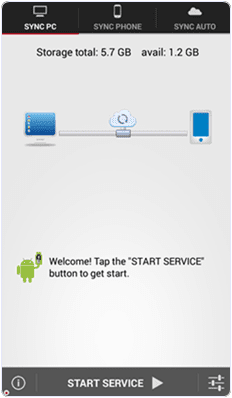
Step 2:Once installed in your phone, just open it and click on START SERVICEas shown below.


Step 3: Connect your computer and the smartphone to thesame Wi -Fi network.

Step : -4> Install and run your app into thesame Android phone.


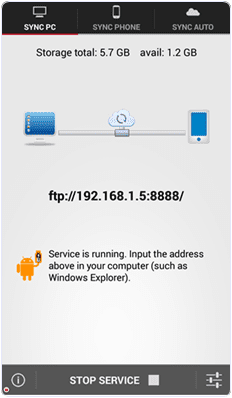
Step : -5> Then you will get ftp://192. 168. 1.5:8888 address , copy that ftp address into your computer address bar and then press on OK button . After that

Step : -6>Storage Folderis automatically generated where your all transfer files stored now .In this way you can transfers the data from your android phone to computer or vice verse .

NOTE:

Share this trick with your friends and if you have any problem then feel free to comment below .

Thanx For Visit!ng us .

How To Extract .apk File From Android Phone?


INTRODUCTION:

Android devices are popular because they provide amazing features at cheap price as compare to IOS or other expensive devices. Android devices are hardware independent and has its own operating system based on Linux. Android devices are very flexible like we can install own UI by installing custom Roms. You can also check Best Android Customs Romsbut to flash all these customized features we need to root android phone .Android have huge marketplace like Google Play Store. Where we can easily find android apps and games easily. But when we find new Apps from Play Store there is only option for install now there. The .apk file is directly installed on our device. Apk file is an installer for Android operating system just like .exe files for Windows. After installation, these files are not available normally to anyone other for sharing and installation into other device as like we share Windows Software setup. So others devices have to download these apps and games again in their Android device. As we already android devices are flexible and huge number of advance apps are developed to access many useful features. As i listed out best root apps for android.There are some apps which provide us such amazing features which are not provided by UI Makers. So to remove such problem of .apk file sharing. Here we are going to provide you some best methods to extract .apk file from installed Android Apps and easily share and install on another device.

STEPS:

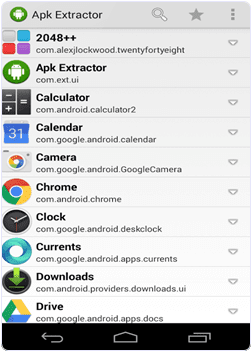
1.Install Apk extractor From Here into your Android device .

2.You can also download file manager to find the .apk file after extracting the file. By default the files are stored in/sdcard/ExtractedApks/.

3.Open the Apk extractor App on your device.

4.After launching the App you will see a list of installed Applications on your Android device.


5.Select the App whose .apk file you want to get.

6.You can also share the apk file tap and select the share option.

7.Tap the menu button-> then setting to change the path where you want to save .apk file.

NOW U DOne :-)

NOTE:

Visit And Share daily