We Use Link Shortner For Short A Long Url. After
My Searching I Collect Many Url Shortner Website
That Can Redirect Your Link.
GO TO BELOW LINK AND ENJOY.


Go to Blogger edit html and find these sentences.Now replace these sentences with your own descriptions.This theme is Bloggerized by Lasantha Bandara - Premiumbloggertemplates.com.

Go to Blogger edit html and find these sentences.Now replace these sentences with your own descriptions.This theme is Bloggerized by Lasantha Bandara - Premiumbloggertemplates.com.

Go to Blogger edit html and find these sentences.Now replace these sentences with your own descriptions.This theme is Bloggerized by Lasantha Bandara - Premiumbloggertemplates.com.

Go to Blogger edit html and find these sentences.Now replace these sentences with your own descriptions.This theme is Bloggerized by Lasantha Bandara - Premiumbloggertemplates.com.

Go to Blogger edit html and find these sentences.Now replace these sentences with your own descriptions.This theme is Bloggerized by Lasantha Bandara - Premiumbloggertemplates.com.

GO TO BELOW LINK AND ENJOY.
Hello dear frnd..... today i share a very useful trick...you will socked to know it.....
Are You Annoyed With Your Friends By There Show Off?? That They Have Latest Android Version Kitkat 4.4.4 With Android L 5.0 Update Guarntee!.
Shut There Mouth By Showing That You Have Latest Android Version 5.0.2. Yes Friends, Its Possible Even If You Don’t Have Updation Guarntee From Your Smartphone Manufacture And You Do No Require Any Coding Language Or Custom Rom For This.
How To Change Android Version To Latest Release:
1. Download Ex-File Manager From Playstore.
2. Then Enable Root Acess For It.
3. Now Choose Device And Click On System.
4. Now Search For Build.Prop File And Edit Is As Shown In Next Step. In Build.Prop File You Will See Text Code As Show Below.
5. Now You Need To Replace 4.4.4 With Your Likely Version. (Ex. 5.0.2 ro.build.version.release=4.4.4)
6. Now Click On Back Button, One Popup Will Be Shown Just Click On Save Button.
7. Reboot [Restart] Your Phone And Check Your Android Version It Will Of The New & Same Android Version Which You Just Edited In Build.prop File..
Don’t You Understand It Properly??
You Need Not To Worry! We Have Made. video Tutorial For Your Better Understanding.
Note: In Order To Use Above Tweak Your Phone Must Be Rooted.
Hi Guys.. Welcome back.. Presenting a cool n amazing trick today, that is, how to download any apk file from Google Play Store Without Doing Log In !
Google play store is a platform to download many android apps. But to download the apps / .apk files you need a google account...
So here is the trick to download android apps / .apk files from Google Play Store without login or without a google account...
You can download android apps to you pc or mobile with this little tip.
How To Download APK Files:
1. First Go to a page of any apps you want from Google Play On any Browser
2. Copy the link (URL) of that page.
3. Now Go to - [APK Downloader website]
(www.apps.evozi.com/apk-downloader/)
4. Then paste that link and click - Generate Download Link.
5. Wait for few seconds and click on - Click Here To Download.
6. Your file start Download.
Enjoy The Site & Dont Forget To Share My Blog With Your Mates..
NOTE: This is an Experimental Method for Educational Purpose. Use at your Own Risk. our blog is not responsible for any loss. But we will just help you if got any. It only works on"MEDIATEK ANDROID DEVICES".
I Personally Request Please don't use it for any Illegal activity.
I have Personally Tested it on MT6589 chipset(Rooted Micromax Canvas HD), But it will work on most of the Mediatek Devices.
Requires Root Access.
After using this trick:
• You can use many trick which involve creating Multiple accounts.
• You can Change your device IMEI to that of iPhone or Blackberry.
• Repair phone having Corrupt or No imei issue.
• Many more...... Steps:
1. Download MTK Engineering Mode from Play Store or from HERE
2. Open the MTK Engineering Mode on your phone.
3. Click MTK Settings.
4. Go Left to Connectivity .On the connectivity panel, select CDS Information.
5. Now, select either the SIM1 or SIM2, depending on whichever SIM you wish to change its IMEI.
6. On this page, click on the AT . About four (4) options should be presented to you, If not then, type p in that box i.e. AT p then delete p. Then the 4 options will come just choose either of this options below:
AT EGMR=1,10,”” -for SIM 2 AT EGMR=1,7,”” -for SIM 1
7. Select either option for preferred sim slot.
8. Now enter preferred IMEI in the above selected box between two quotes "".
Like:AT EGMR=1,7,”3559972068800775 ″ Don't forget to input imei in above step.
9 . Now select SEND AT COMMAND.
10. Now Restart your Phone or Switch ON then OFF Flight Mode.
ENJOY & VISIT DAILY.. :*
First, for the newbies, let me clarify what rooting is. Getting root or rooting your phone is the process of modifying the operating system that shipped with your device to grant you complete control over it.
This means you can overcome limitations that the carriers and manufacturers put on your phone, extend system functionality, and even upgrade it to a custom flavor of Android.
The name root comes from the Linux operating system world, where the most privileged user on the system (otherwise known as Administrator on Windows) is called root
Installing a ROM may require rooting first, but just rooting can be usually done in only a few minutes, keeping your stock OS otherwise completely intact.
Different Mobile have Different rooting process ..
Usually rooting is fairly simple - in most cases you can find several videos and articles on the web that explain how to do it on your specific phone model - just
Google ''YOURPHONEMODEL root''.
Rooting is not something manufacturers or carriers approve of but they can''t really prevent it from happening because the rooting process usually exploits a vulnerability in the operating system code or device drivers and allows the ''hacker'' to upload a special program called su to the phone. This program is the one that provides root access to programs that request it.

Need to transfer files from your computer to your mobile device through a USB cable? Worried of low storage space in your mobile device? Ever thought of accessing your computer from your android mobile or an Iphone? How easy would it be to access PC data without really sitting infront of it with a keyboard and mouse. The happy news is “YES YOU CAN DO IT”, All you need is the Polkast app, which you could DOWNLOAD for free and have access to the data on your computer. You can use it to Access Pc With Your Android Mobile or Iphone easily.
Polkast is a cloud service through which you can create your own personal cloud with this app. Any file on the pc can be now accessed from your mobile phones itself, irrespective of the fact wherever you are.To make the polkast app work you need to install the server app on your computer and the client app on your mobile device such as phone or tab. Both the server and client versions of polkast are available as a free download from the Polkast website.
1) Download folkast on pc and andriod phone and iphone etc.
2) Install it on both.
3) Create acount and enjoy. That’s it, This is yet another simple and easy trick which you can do to access your files on your computer through your android mobile or Iphone. So what are you waiting, start downloading the Polkat app HERE The complete solution for your low storage in your mobile device.
Hellow Guys Welcome Back On All-hacking-tricks.tk..
Today I Will Teach You, How To Control Your Android From Pc.
■ You can also directly talk from PC.
■ Send and Receive SMS from PC.
■ Transfer apps,images,videos,files from PC to mobile through wireless network.
■ Install/Uninstall apps easily and also take complete back up of your device.
■ Trace your device when you lost it and much more features available in Airdroid...
1- First Of All Download AirDroid App From Playstore Or FROM HERE
2- After Download Install it and Open this app then Click on Start icon.
3- After open it , copy the web address after clicking start icon.
4- Now from PC browser go to web.airdroid.com then Enter the Web address you copied in step no 3.
5- Make sure that your android device and PC is connected to same Network.
6- If you are going for web.android.com then you need to verify your device by entering pin/ password or by scanning QR code..
That sid. :)
Now you have successfully connected your android device to PC .You can start upload files by clicking files logo on desktop,you can chat from your PC and can have full access to your android device or android tablet
.
Plz cmnt..
Your Comment Is useful For me..
VOB is a file extension that mostly found on DVD disks. A VOB extension can contain anything from audio and video to subtitle and menu information.
Unfortunately, it is a kind of file format that are not supported by the default Android video player..
To be able to play .VOB files, you need to install a third-party video player, which can play various formats including .VOB format, in your Android device. One of the best Android video player apps to play .VOB file is Wondershare player
Wondershare player is a free media player that lets you play video and audio files in all popular media file format like AVI, FLV, MKV, WMV, VOB, MOV, RM, RMVB, ASF, MP3, WMA, AAC, FLAC, M2TS, F4V, 3GP, and more.
It also supports subtitles embedded video files, such as .SSA, .SMI, .SRT, .SUB, .MPL, .PSB, and .TXT.
1. Download and install Wondershare player
app on your Android
phone or tablet
2. Once installed,
launch the app
3. On the Local menu, tap on the ‘three horizontal lines’ that are placed at the top left corner of the screen and then tap on ‘Gear’ icon to open the settings menu.
4. In the Settings menu, tap on ‘Decoding Mode’ option..
5. Now, you’ll see a number of file formats which are supported by Wondershare player. Find ‘VOB’ format and tap on it and then check the ‘Auto’ option. Done!

Now, Wondershare Player will start supporting .VOB video files in your Android phone and you can start playing the video file without any interruption...
Thats It..
Till Now Im Posted Many Useful Tricks..
Today Im Posting Very Useful Trick To All Of You..
Yes.. I Know After Reading My Trick Everyone Getting Relax..
So, Your Wait is Over.. Today Im Giving You Trick, To Login any Website Without Sign-Up..
Many Website has a forced login System.. Means For Browsing Such Sites You should Need To Login..
And Its Very Time Taking.. So, Today Your Problem Will Solve..
just Go On Below Website
Then You Will Go On Homepage, There Is a Box Just Type Name Of Website in that Box which logins you want..
And Press Get Logins Button..
Wow its Done... You Will Get Logins For that Website..
Enjoy...
Please Give Comments If You Like This Trick.

Apps geyser is the best for creating android apps without coding.
By Using Apps-geyserYou Can Create many types of apps like web browser games youtube app etc.
For Making App You Have To Create A Account On AppsGeyser Site
1. No Need Of Coding
2. Free Of Cost
3. HTML 5 Support
I Hope That You Like This Post.
Enjoy

LIST OF BEST FREE SMS SITES (India)
Enjoy Guys! and don't forget to post your comments. ©
Samsung reset code
This code will restore you phone back to Factory settings without deleting any of your data"
On the homescreen of your phone, dial:
#*7728# on legacy models
*2767*3855# on the recent models (Monte, Omnia..etc)
Note => For educational Info only, try it on your own risk. We are not responsible for any Damage
Hi.. Welcome Again
Here's I'm A Cool Trick, 'How to Remove or Un - Lock pattern in all All Sony Xperia M' How to Remove or Un - Lock pattern in all All Sony Xperia M...
Guys there are many method for Remove Pattern Lock on All Sony Xperia M C2004 and C2005 DUAL and C1904 or C1905 and also many other Sony Xperia M version, But below shared methiod is more easy and also easy to understand, Using using this you can quicly remove in your smart phone, Lets read.
Steps To 'Remove or Un - Lock pattern in all All Sony Xperia M'
# Now simply Turn off your Sony Xperia M Mobile Phone.
#Now together Press and Hold Key..
#Now Just press
Power Button + Volume Up Button.
#Then just follow LCD screen For hard reset...your any Sony Xperia M Mobile.
Final useful Tips for Remove Pattern Lock of Sony Xperia M
Friends this method completed by hard reset your mobile phone, If you have useful a data in your Sony Xperia M phone,
then you can use another method,
Because it will delete your all data. So if you have useful a data in your mobile memory then you can use another way, We are trying to complete all steps which most required in this tutorial,
If you not find any step or you have any question on un lock Sony Xperia M mobile phone, then just comment below.
We will trying to update your answer as well as soon as possible.
Have you ever wondered if your screen goes transparent. In listening first it might look like magic but the place where innovation meets creativity nd talent something strange happens nd this app is really awesome so check out this app
100% Working
Check out here https://play.google.com/store/apps/details?id=us.porrassoft.transparentscreen
Step : -1> Connect your computer and the smartphone to the same Wi -Fi network.
Step : -2> Go to Google Play Store .
Step : -3> Download Software Data Cable App into your mobile .
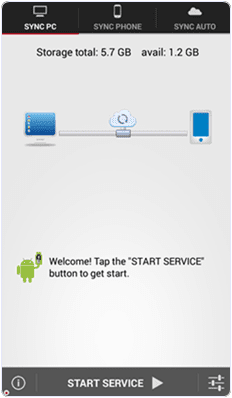
Step : -4> Install and run your app into the same Android phone.
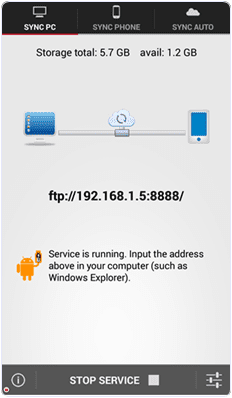
Step : -5> Then you will get ftp: / / 192. 168. 1.5 :8888 address , copy that ftp address into your computer address bar and then press on OK button . After that
Step : -6> Storage Folder is automatically generated where your all transfer files stored now .In this way you can transfers the data from your android phone to computer or vice verse .
Share this trick with your friends and if you have any problem then feel free to comment below .
Thanx For Visit!ng us .