This is default featured slide 1 title
Go to Blogger edit html and find these sentences.Now replace these sentences with your own descriptions.This theme is Bloggerized by Lasantha Bandara - Premiumbloggertemplates.com.

This is default featured slide 2 title
Go to Blogger edit html and find these sentences.Now replace these sentences with your own descriptions.This theme is Bloggerized by Lasantha Bandara - Premiumbloggertemplates.com.

This is default featured slide 3 title
Go to Blogger edit html and find these sentences.Now replace these sentences with your own descriptions.This theme is Bloggerized by Lasantha Bandara - Premiumbloggertemplates.com.

This is default featured slide 4 title
Go to Blogger edit html and find these sentences.Now replace these sentences with your own descriptions.This theme is Bloggerized by Lasantha Bandara - Premiumbloggertemplates.com.

This is default featured slide 5 title
Go to Blogger edit html and find these sentences.Now replace these sentences with your own descriptions.This theme is Bloggerized by Lasantha Bandara - Premiumbloggertemplates.com.
Saturday, 8 August 2015

Share ZIP, PDF, EXE, APK, RAR and Big Files In WhatsApp


First of all install DropBox and CloudSend Application in your mobile
Now open CloudSend , you will be prompted to link with Dropbox. Click Allow ( This is an important step in this Cool WhatsApp Tips And Tricks)
Share the file on CloudSend which you want to share with your friends on whatsapp. File be automatically uploaded to your DropBox server and link will be provided to that file Copy the given link and share it to with your friends on WhatsApp. You friend will simply open that link and can able to download the file in their mobile
Love this Cool WhatsApp tricks 2015? Now move to other WhatsApp tips and tricks.
Trick to Create Fake WhatsApp Chat /Conversation

All you can do these types of WhatsApp Prank with your buddies by an android application called WhatSaid – Download WhatSaid App for Android
Now with this app, you will be able to create fake whatsapp conversation with anyone by simply inserting their pictures, name and then create your own messages (Fake messages)
. Any problem, comment here.Friday, 7 August 2015
Install WhatsApp on Pc
Follow These Steps
Step-1 First Of All Download Bluestack In Your Pc
Click Here For Download BlueStack
Step-2 After that install it in your PC or Laptop
Step-3 After That You Have To Install WhatsApp Apk In Your PC
Step-4 After downloadind click on Whatsapp apk file and it will be installed in your PC or Laptop Step-5 After that open Bluestack Select My Apps Step-6 You can see Whatsapp there Click on Whatsapp
Accept agreement Type your mobile number The verification will fail Then you click on Call me You will recieve a call with confirmation number Note down that number and type it in verification code field Now its done!!!!!!!
How to Use Multiple Numbers on WhatsApp in a Android
Hey guys, After a letter from whatsapp.inc author of ogwhatsapp has stopped its development..
Ogwhatsapp was an interesting developement giving users advantage of using two accounts on same phone..
As of now the base used for last Ogwhatsapp has hit its expiry date..
I'm providing a tutorial, Exclusive by Safetricks.Heck.iN, by using which, You can still use multiple numbers on same phone if your phone is rooted..
STEPS:-
Install titanium backup from play store. (Root is required for this app).
2) Open it and give superuser permission..
3) Tap on switch profile in bottom right corner..
4) Here you have to create two data profiles with any name (eg. All and whatsapp2).
5) Again tap on switch profile and select all (main profile).
6) Now go to backup/ restore tab on top. Locate whatsapp.
7) Tap on whatsapp then swipe right for special features..
8) Tap on enable multiple profile for this app.
9) Confirm any prompt. This will store your current whatsapp profile to data profile 'all'.
10) Now again go to overview tab and tap on select data profile and select 'whatsapp2'.
11) Now go to whatsapp and you can see the first installation window. Register your second number there. And you are done..
12) For switching between numbers use titanium backup and switch data profiles..
NOTE: You can use more than two numbers by this method.. ! So use it as soon as soon it will be fixed..
Any problem..
Just comment
How to Disable The Whatsapp Auto Image Download
Hi Guys... .
WhatsApp Has A Default Function Of Auto-Downloading Of Pictures For Chats.. . Now You Can Disable By below steps :- .
First go to whatsapp settings > Chat settings > Media auto download.
Now select the option as per your choice.If you want to stop the auto download completely,
you may make all options No Media .

I Hope, You'll Like It..
Must Share & Visit Daily !
Ultimate way to hack your friend’s whatsapp (only for education purpose) ??

Hi friends, whatsapp is best messagening app for mobile which allows you to send messages, pics, videos etc with fast speed. Whatsapp is fast,reliable and easy to use.Whatsapp have 700 million users wordwide.Its popularity is increasing day by day.
Hack your friend’s whatsapp so today i am going to share you a way by which you can hack your friend’s whatsapp .So just follow the
steps–>
step 1–> first of all, go to your microSD card and click on whatsapp and then on Database.
step 2–> here in database folder you find 2 files–>
1.-mgstore-yyyy..dd..db.crypt
2.-msgstore.db.crypt
step 3–> now after this you have to take these 2 same files from your friends mobile.
step 4–> now just open these files with any text editor. now you can able to read your friends private messages & conversations.
–> So that’s how you can hack your friend’s whatsapp
–> Stay updated..if you want more tricks then please share it on Facebook,twitter, Google+
NOTE–> This article is Only for educational purpose. i am not responsibe for any misuse of this trick.
Thursday, 23 July 2015
Hack Whatsapp Account With Spy Softwares

INTRODUCTION:
Today whatsapp is the most popular messaging App. Attractive features like cross-platform support, media sharing and ease of use has made WhatsApp to be the top choice among most smart phone users. Hacking friends WhatsApp acoount would be fun.This article will epossible ways through which you can hack WhatsApp acoounts.
STEPS:
*.download Spy Software Here
Spy Software Using a spy software program is the easiest way tospy on WhatsApp messages. Although there are a handful of companies marketing substandard WhatsApp spy programs on the market today,
there exists a few genuine products as well thatare worth considering. One of the best software to spy on WhatsApp is mSpy which is known for its quality and top notch features.
You will have to download and install the mSpy app onto the targetphone on which you need to monitor WhatsApp messages..
For this you should have the target phonein your hand at least for a few minutes.
Once the installation is complete, the monitoring process of WhatsApp messages will begin and the recorded logs are silently uploaded to your mSpy account. You can login to your online account at any time to view the logs containing WhatsApp messages and other activity details.
NOTE:
Visit Daily
Sunday, 19 July 2015
10 Whatsapp Features You Should definitely Know About

INTRODUCTION:
As Whatsapp has become, one of the most popular messaging app. All the Whatsapp users should definitely know the basic features of this app, so that their messaging experience get better and fun.Here, we listten things you can do with WhatsAppthat are not immediately obvious in the application. Some are available only in the Android Version of Whatsapp, while others can be enjoyed across all the platforms that have the app.
10 Features
1) You Can Send WhatsApp conversation history to anyone via E-Mail:This feature allow you to send an entire conversation history from WhatsApp through email. If it is an Android Phone, you have to click on the Menu option in a conversation , which is found on the bottom-right of the screen, go to‘More’and select‘Email Conversation’, before you enter the address of the recipient. WhatsApp will create an E-Mail with the whole text conversation, including any pictures, voice or video clips.

2) You can Change the WhatsApp chat wallpaper:Hey are you bored up with the same old colorless background on Chat screen? Then why don’t you change it !. You can choose a background to appear in this window by going to the ‘Wallpaper’ option in the chat menu. You can either select a picture that’s on your Android phone, or choose to use one of the delightful backgrounds in theWhatsapp Wallpaper app. This app is automatically downloaded when you choose the‘WhatsApp’option in the Wallpapers menu.

3) Save photos you’ve received:The images and videos that you’re sent on Whatsapp, and which you download, remain stored on your device in the WhatsApp\media\WhatsApp Images folder. In Android, you can view these images in the Gallery, and can share them on other sites too. In iOS,WhatsApp images are stored in the Photos app.
4. Make back-ups of your WhatsApp conversations:If your WhatsApp conversations are important to you, it’s a good idea to make backups of them so that you don’t lose them if there’s a problem with the app. To do this, go to the Settings menu, choose ‘Chat preferences’, then click on the Chat history backup option.Don’t worry about remembering to make daily backups, because WhatsApp automatically saves a copy of your conversations at 4 AM each day.And that’s so easy.
5) Use the Enter key to send WhatsApp messages:There’s an option in WhatsApp, however, that lets you use the Enter key on the Android virtual keyboard to send messages instead of having to press the Send button in WhatsApp.To enable the option, go to‘Chat preferences’within the Settings menu and check the ‘Enter is send’ box. This option is not available in the iOS version of WhatsApp.
6. You can create shortcuts to WhatsApp conversations:You might get fed up of launching the app every time you want to speak to someone. In the Android version of the app you can create shortcuts to conversations that appear on your home screen so that you don’t even need to open the application to pick up on conversations – just tap the icon with the name of the contact.
7. You Can keep a WhatsApp profile picture:This is a very basic and simple feature.It’s possible to set your own WhatsApp profile picture, by going into Settings and choosing ‘Profile‘. Just tap on the existing profile image and select a picture you’d like to replace it with. You can pick an image that’s stored on your phone already, or snap a photo using your device’s camera.
8. There is much more to send than just text: Do you only send text messages to your friend ? You should take advantage of the various other sharing options the app has. With WhatsApp, you can also sendpictures,videos,Voice Messages, yourlocation,and evencontacts.
9. Change your WhatsApp status: There’s a Status option within the main WhatsApp menu, and you can type your own message or choose one of the preset status messages in the list.This status message then appears next to your name when you appear in people’s contact lists.
10. Broadcast a WhatsApp message to many contacts:This is a very useful feature, a time saver.If you need to quickly get a message out to more than one person at a time, the easiest way to do this is to ‘broadcast’ a message in WhatsApp.Just select the ‘Broadcast message’ option in the More menu and select the contacts you want to send it to. Now type your message and hit ‘Send’.
How to send texts with different format on Whatsapp?

INTRODUCTION:
How boring is it to send your friend texts in same old boring format! Have you ever wished that whatsapp texting format should be made fun ? If yes then, there is a good news for you, now there is a way out there through which , you can send text to your friends on whatsapp in variety of formats, to know more read the following….
First of all you have to install Text Art App for Whatsapp from here
STEPS:
first Open This App
Step 1: Enter the text to send. Use the [Edit Text] button or just double-click the preview area.
Step 2: Select the preset/design that you like.
Step 3: Customize the design by changing the font from those available.
Step 4: Change the color of the new design.
Step 5: Change other layout settings: margins, aspect ratio, alignment,…

Through this app you can , you can have fun texting experience, you can impress your friends through this app.
NOTE:
1.The preview image allows you to zoom / pan using pinch / drag.
2.Double-click on the preview image to edit the text
3.From the settings you can change the configuration of the break-lines and the size of the resulting images.
4.From your favorite chat program, click on the “clip” to attach files, select Text Art and quickly send that creative text to impress your contacts.
5.Now you can create square images to fit in the profile photo of your favorite chat app:
How to hide your Mobile-Number on WhatsApp Group ?

INTRODUCTION:
Most of us do group chats in Whatsapp, but there are friends who add us in groups, where many unknown people are also added, and in that case , our number is revealed to people whom we don’t even know ,and that could prove to be a risky matter .
This is an awesome trick which can help you to hide your phone number on Whatsapp account during group chats., thus you can feel safe even if you are added in a group with many unknown people
So here are the Steps to hide your Mobile Number on Whatsapp group :
STEPS:
First uninstall the Whatsapp App from your device completely
. 1) Again install the App from google play store at the time of verification .. here we need to play our main game
2) While verification it’ll ask you to verify your phone number. It automatically sends a verification message to its server. But if this happens your number gets registered with them.
So block your message service. You can simply put your phone on flight mode so that all network connections are disabled. You can alternatively change the message center number.

3) Choose ‘Verify through sms’ and enter your email id and Click on send. Now Without wasting a single second, click on Cancel. This terminates the authorization process.
4) Now you have to spoof that message, for that download Spoof Text message.
5) Now go to Outbox > Copy the message details of Spoof App > send it to Spoofed Verification
6) Now a message will be sent through that spoofed number. Now that Spoofed number is visible to others instead of your original mobile number.
7) You can use these details.
To: +447900347295 From: +(Country code)(mobile number) Message: Enter you email id
Hope you have got the hang of it , have safe chatting !!
NOTE:
Sometimes later the messages will be sent to that spoofed number and it will appear to all in Group chats than to use your Original number.
Friday, 17 July 2015
How To Use Whatsapp Without Using Your Phone Number?[EXCLUSIVE]

INTRODUCTION:
Hello Friends I Am Back With Great Whatsapp Trick Wait Over Now you can use whatsapp without number that means Not with your own number. I will Tell you How you can activate whatsapp with a number which is not your own Ex.Fake WhatsApp Number.Just Follow Below Steps
STEPS:
1) First Download VOXOX App
2) Now open Voxox app and Click on Sign Me Up!
3) Select country code +91 and enter your mobile number. Email address, username and choose any password. and Click on Sign up.
4) Verify your mobile number. Sometime voxox app not accept signup so if you getting problem while signup then Install Google Play Service From Play Store and Try Again.
5) Login To Your VOXOX Account.
6) Now you will get a other country number in International format in app.
To check number that you got click on “More” and see your voxox number. It always remain same for your voxox account.
7) Welll !! You Can Create New Whatsapp Account. Or You Can Also Use This Number For Your Old Whatsapp Account.
8) Just Go to whatsapp Open Setting->Account->> Change number->> Next->>Enter your old number and in New phone number box enter your voxox number by selecting correct country code. (If you got voxox number Like this +16195039296 then select country code +1 and enter 6195039296 in new number box)
9) You will get whatsapp code in voxox app in Messages tab..Enter that code in whatsapp after finish auto verification time or open link that you got in voxox.
Now You Done !! Enjoy Whatsapp Without Your Number.
NOTE:
Dont Use it For Any Illegal Purpose iT iS Only For Infromation and For Fun With Your Friends. iF You miss Use iT Then I Am Not Responsible.
Sunday, 12 July 2015
How To Reply Your Whatsapp Messages Without Opening Whatsapp?
Now I'm going to share a helpful trick which will make your life easy. Many friends here use whatsapp and its feel irritating when you surfing net or doing something on the web & suddenly a message of your whatsapp friend appears in the notification bar, you have to minimize the task & have to open whatsapp to reply.
But now from today you don't have to do that. Just follow my below trick and it will be veryeasy to chat with your whatsapp friend without opening Whatsapp.
STEPS:
1.Open whatsapp->go to settings->notifications- >pop-up notifications->tick

2.on only when screen on Now you will get pop up notifications of any message
3.you got in whatsapp & you can directly reply to them
NOTE:
There is two pop up notification option in settings,tick both to get pop up message from single friend or from groups Thats it..Enjoy
Sunday, 5 July 2015
Unblock Yourself from someone’s WhatsApp Account

INTRODUCTION:
Are you blocked from your friends? Ohoo!!! I know getting blocked is the worst part in the WhatsApp. But with the help of this article you’ll know a work around on – How to get unblocked from someone’s WhatsApp.
I’ll show you steps to unblock yourself from others account without notifying your friend. I know you are curious to know his/her profile picture, last seen, whatsapp status and by the end of this article you’ll find yourself unblocked for sure. But to be unblocked one should know that if he/she is blocked. So let’s take a look to how do you know whether you’re blocked by someone else or not?
.Firstly, check if your friend’s “profile picture” or “last seen” or “whatsapp status” are visible to your or not. And if not then you’re blocked.

*.Secondly send a message to that account and if it shows only one tick sign i.e. the message has been send but not delivered, then you may be blocked.

STEPS:
*.Open WhatsApp
*.Go to Settings
*.Hit on Account
*.Now click on Delete my account (Don’t worry you can run it again)

*.Enter your phone number and delete your account.
*.Now Uninstall WhatsApp messenger

After the WhatsApp is uninstalled properly, restart your phone or device. *.Go to Play Store and Install WhatsApp again.

*.Enter the asked details to start again with it and yes your own phone number.

*.Taddaaaa!!!! All done; now you’ve been unblocked from your friend’s WhatsApp account without letting them know a bit. Enjoy and start texting them.
.NOTE:
Hope you’ve unblocked yourself and easily able to text them. But deleting your WhatsApp account will have lead you to forcefully leave all the groups in which you were a member so ask them to add you again. And an important note is that if you’ve the latest version of WhatsApp this work around is not for them. This will only work on the older version.
How To Track Any Whatsapp Number secret Details?

INTRODUCTION:
So here I am going to share a new tutorial about whatsapp. Its a good tool to monitor someone.
Its a way to look at people's last seen even if they have hidden it, its a way to dox some one.. a much more advance level to look at last seen and history.
MUST READ
Unblock Yourself from someone’s WhatsApp Account
STEPS:
1.Install This App From Here
2.Open this App And Insert the number you want to monitor.
3.And then Here you go.
4.You can look at their last seen.
5.Get notified by a long viberation when they come online.
6.All in the form of best history.
7..Also, you could check someone's profile even if you already blocked them.
7.It shows how many minutes/hours they Have been on whatsapp.
NOTE:
any Problew Cmnt below
How To Install Two Whatsapp Account in Same Device

INTRODUCTION:
How To Use Two Whatsapp Account in Same Device in this trick
we not provide you OG Whatsapp we provide you something different.
Today i am sharing with you use multiple account in android device without root. When we root our device then company automatically erase your device warranty.
Today me tell you new app the name of the App is WhatsMapp Solo. Simply downloading the app and follow the instructions. Now i am sharing this cool method.....
Cool Features:
1.New Modfied Custom Icon
2.Notification bar Modified
3.Navigaten Bar Colour Changed
4.Antiiban
5.No Need Of Root
6.Very Light and Uniq
7.Hide Last Seen
8.Hide Typing
9.Hide Online
STEPS:
1.Firstly Create a Backup Of your Orignal Whatsapp.
2.Now Uninstall Your Orignal Whatsapp.
3.Now Download WhatsMapp Solo.
4.Login with yourOrignal Number.
5.Verify Mobile Number and restore backup.
6.Now You have real Number onWhatsapp Solo.
7.Now Install Orignal whatsapp and fill your Second Mobile Number. Complete Verification Process Simply
8.Now It's Donee and Use Two Whatsapp in Same Device
How To Use WhatsApp Without Any Mobile Number !![Working 2015]

INTRODUCTION:
Hi Guys... Its A Wonderfull Trick To Use WhatsApp without Any Mobile Number – Cool WhatsApp Tricks
#This whatsapp trick is tweaky, you can use whatsapp without number that means not with your own number. I will guide you how you can activate whatsapp with a number which is not your own i.e fake. Follow below steps to use whatsapp without number a cool whatsapp tricks:
STEPS:
# First of all you are required to uninstall whatsapp from your mobile
# Now, download whatsapp again from Play Store and install it
# Disable messaging services (Enable Flight Mode)
# Open whatsapp application and insert your number inside.
# Now whatsapp will not able to send the message to it server to verify as you have enable flight mode in your mobile
# So now whatsapp will prompt you to choose alternate methods to verify your number...
# Now choose “Check through SMS” and enter your email address....
# Click send button and then instantly click Cancel button...
This is required to terminate authorization process...
# Now the main process of this cool whatsapp trick is begun.
Install Spoof Messages apps in your mobile...
Android users install Sdpoof Text Message (Search in Google Play Store)
#iPhone users install Fake-A- Message
# Now go to the outbox and copy the message details Spoofer Application and send it to spoofed verification i.e. false verification
Use given details in Spoofed Message: To: 447900347295 from (country code) (mobile number) Message: Your Email Address
# After this, a message will be sent to the spoofed number and then you will be able to use this number to connect with friends in whatsapp...
(Attention Please If above given Spoof Text Message app is not working properly for Android, then you can try their alternate. You can search spoof text message app in the play stores)
Whatsapp Spammer Android App: Spam Inbox Of Anybody On Whatsapp (Working)
INTRODUCTION:
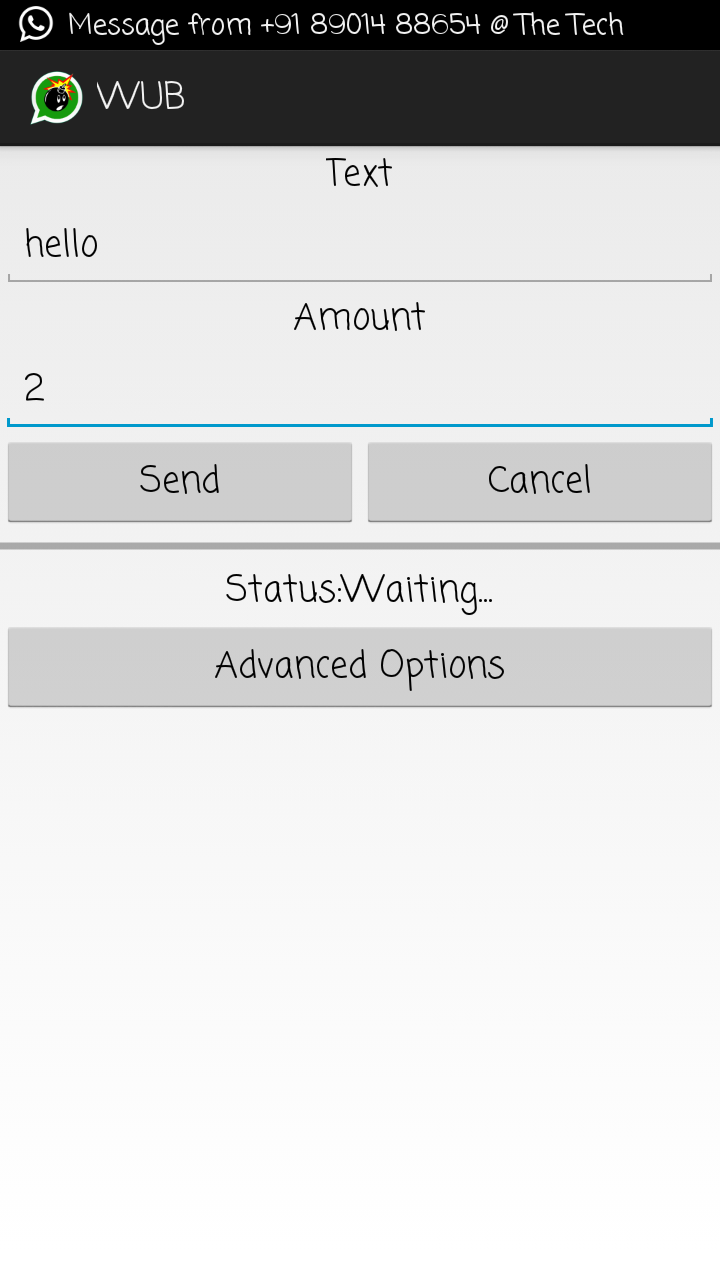
As you all know that we use whatsapp everyday and sometimes we need to spam the inbox of spammer who spams us.
So today we brought a new app by which you can spam any people's inbox of whatsapp by sending multiple messages to that people.
By this app you can send same message multiple times by just one click. This app allows you to send same message as much times you want.
So it's a good app if you wanna spam inbox of somebody. :P
STEPS:
*.First Download Whatsapp Spammer App.apk From Here
*.Open the app
*.In the first box Enter Your Message
*.In second box type the amountHow Much Times You Wants To Send The Message
*.Then Click on Send Button
*.Now Choose The Whatsapp contact or group whom inbox you wants to spam.
*.Bravo! You are done now. Your victims inbox will be spammed now.
NOTE:
Use This App Only For Educational Purpose
How To Send Messege To A Person On WhatsApp Who Blocked You?

INTRODUCTION:
Hi Guys... In this post, I will teach you 'How to send messege on whatsapp to a person, Who blocked you'
Its A Very Simple Trick To Send It, Just Go By Following Steps..
STEPS:
-> Just create a group by another number which is not blocked by the victim. OR
->Tell your friend to make a group and to add your number and victim's number in the specific group.
-> Now you can send messages or u can able to chat with your victim.
Its A Simple & Working method...
Keep visiting for more
How To Check Who Has Read Your Message In WhatsApp Groups?

INTRODUCTION:
Hi Guys... In What’s app group chat is really a fun, chat with all your friends at once, but it becomes very difficult to determine who has read your message ,for individual message the blue ticks and double ticks make it very easy and simple...
Here is the method to view Reads for group chat...What’s app is one of the most popular messaging service with over 500 Million active monthly users and 700 Million Photos,100 Million videos shared every day...
STEPS:
To view the message reads on a group
*just open a group... Click and hold a single message and tap “i” from top...
*You will get the status for reads.

Now when you know how to determine who has read your message ,
You can easily point out which friends have read the message and which once has got it delivered and the remaining once haven’t actually received the message yet...
Stay Visiting & Thanx 4 visiting